Showing posts with label Apps. Show all posts

Saturday, July 5, 2014

ColAR App!

I recently presented at the technology conference that my district put on in June and it was amazing. I presented two sessions about how to use the app nearpod in the secondary classroom, but before that, I went to three other sessions as a conference attendee and they were all amazing! I am going to have a few blog posts to write about my findings :)

The first session I went to was about how to integrate augmented reality into the classroom. I have used the app Aurasma before, but that was the extent of augmented reality that had ever entered my classroom! For those of you who are wondering what augmented reality is, it is where you use a "marker" or target of some sort and it can be anything. The easiest way to explain it is to think of a qr code and what happens when you scan it. With augmented reality, when you use an app that supports AR, it will make something show on your device that really isn't there in reality. I did a really bad job of explaining that but it is super cool and your kids will love it so you should look into it. 

Ok, so because I don't have kids, and we have been out of school for a month, I had to find someone that was like a child to try this out. My did is still a six year old at heart, so I brought the crayons to color in this picture. 


You can see the website on the picture where I went to print these out. They have tons! But, in the holiday spirit, I went with the July 4th themed picture. They obviously come out blank, but I got way too excited and didn't snap a pic! 

So, basically, you print and color. Then comes the real fun...

You download the ColAR app on your iPad or other device. Get it? Color but the AR comes from augmented reality?? I thought it was clever. Moving on...

When you open the app to scan the picture and make it come to life, you have to make sure the whole page can be seen. Then, you will see yours look something like this:
That means it is getting ready to work and is taking notice of all of the colors and patterns that you used to color. It doesn't matter if you use crayons, colored pencils, markers, pens, or any other art supply. It should still work. 

Then, the magic happens!
Isn't that fantastic! I couldn't quite get the camera to cooperate, but if you touch the firecrackers, they will actually shoot off and make a pretty fireworks display right on the iPad! It was so fun! Apparently in each picture, there is a way to interact with what you see.

I am not sure how I can use this in the classroom, but it would be good to have these on hand for after tests or exams at the end of the year. All I know is that the first time your kids tell you that they are bored this summer, pull out one of these sheets and they will be busy for hours!


Thursday, August 1, 2013

Throwdown Thursday - Making learning interactive with CLICKERS!


I am linking up with Erin over at Lovin' Lit for her monthly Throwdown Thursday!


I know that this is not a new concept...many schools have used a version of the "clicker" or some sort of student response system long before my campus got them 5 years ago. I don't use them all the time, but boy are the students engaged when we do!

The ones that we have look like this:

I am sure there are newer versions. You can use these several ways: it's easiest to begin using these where the the students sign in anonymously (no student login required) to assess and see what students know about a particular topic. Simply set up your lesson for the day in SMART notebook or whatever software comes with yours and insert slides to "ask a question." A professor of mine did this in college and we never knew when the questions were coming. This forced us to stay awake in an 8AM Oceanography class...yawn. BUT, there was something fantastic about the immediate feedback that he received from us as well as immediate feedback from him when we found out the correct answers.

There are several ways that you can ask questions, true/false, multiple choice, short answer, and many more. Mostly, I have used these whenever we give a pre-assessment that is multiple choice because the students log in and there is not any grading required. This year, however, I want to incorporate these into my daily lessons for more interaction!

Don't have the funds for these? There are several FREE options for you if you have access to iPads or if you are a school in which kids bring their own devices. The app is called Socrative and you can find out more information about it here!

Saturday, June 22, 2013

This is What Happens When I Get Bored in the Summer...

I know, I know...it's summer! How could I possibly get bored? Well, we've spent the better part of the last week lounging around not doing a whole lot. I did get several new products uploaded to my TpT Store that I am rather excited about and presented at our district's technology conference so I guess I didn't completely waste away the week!

But, this brings me to my new "obsession"...creating fonts! I have always been in awe of people who create their own fonts that look so professional. I love several sellers' fonts on TpT (Cara Carroll, Kimberly Geswein just to name a few!) and I have often wondered "how the heck do they do that!?"

So, I sat down this afternoon while the hubs set off to read take a nap to do some research on how to exactly create a font. Sure, I knew how to do it online at sites like this one, where you print off the template and create each letter with black pen or marker, scan it back onto your computer and upload the file to the site. From there, your font is converted into your very own TTF--ready to be installed on your computer! Super cool, right? Only I knew there HAD to be an easier way that didn't require all of those extra steps...I know, first world problems, right??

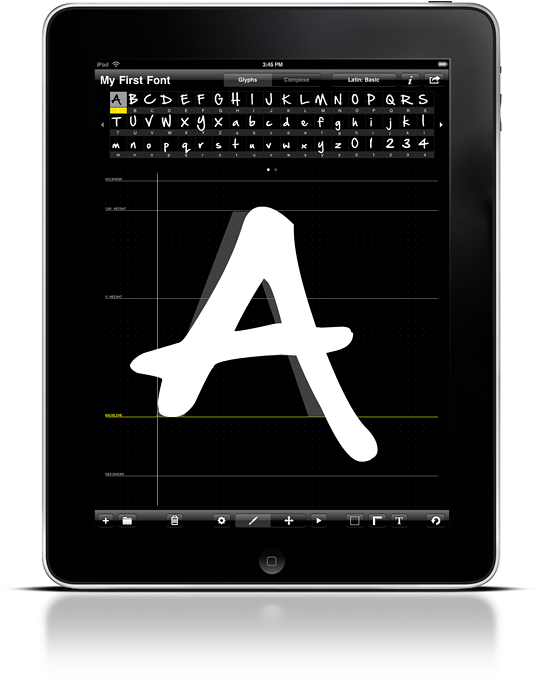
Enter this app for iPad:


Screen
Yes, the iFontmaker app. DREAM COME TRUE!

So, while catching up on my favorite TV shows this afternoon, I knocked out these seven bad boys and put them up for sale on TpT:


Not only did I post them here on TpT, but I made them available as a LIFETIME LICENSE bundle with no additional license necessary to use for either personal or commercial use! In addition, no credit is required when selling products that you create with these fonts! 

There are currently 7 fonts in the bundle priced at a LOW $1.50, but as I add more fonts, the price will go up. If you jump on this deal NOW, you will be able to download all additional fonts FREE OF CHARGE!

Feel free to ask me any questions before you purchase, either in the comments below, or on TpT. 

Happy Saturday!